Globus Data Transfer
Overview
Globus is the recommended tool for transferring large research datasets between your workstation, and AUHPCS or Next-Generation storage systems. It is secure, scalable, supports resume functionality, and handles large files more efficiently than tools like scp or rsync.
Using Globus (Quick Start)
Visit https://www.globus.org and log in with your AU NetID credentials.
In the File Manager, search for one of the following collections:
AUHPCS
Next-Generation Research Data Storage
Begin transferring files using the web interface.
Install Globus Connect Personal to configure your computer as the second collection: https://www.globus.org/globus-connect-personal
Tip
These endpoints are backed by GridFTP for high performance and allow restart/resume functionality. Use the AUHPCS endpoint for direct HPC filesystem transfers. Use the Next-Gen endpoint for broader research storage access.
Note
AUHPCS: Augusta University High Performance Computing Services filesystems. Next-Generation Research Data Storage: Shares a high-speed edge with AUHPCS data transfer nodes.
Identity Verification Prompt
Before accessing Next-Generation Research Data Storage or AUHPCS collections in Globus, you may encounter an “Identity Required” screen.
It occurs when:
Additional consent is required by the endpoint’s policies.
You haven’t previously linked or authenticated your institutional identity (e.g., Augusta University).
To proceed:
Select Augusta University as your identity provider.
Log in with your AU NetID and complete Duo authentication.
Grant any requested permissions to Globus.
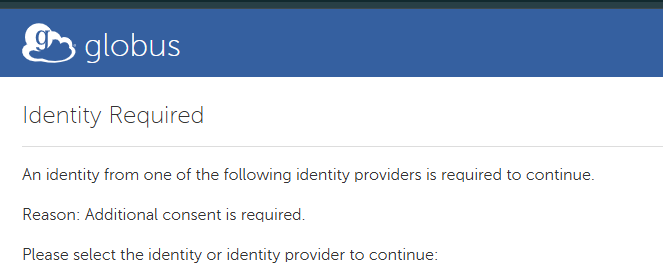
You may see this screen when opening restricted AU collections in Globus. Select your userID or Augusta University to proceed.
Use Cases and Performance Notes
HTTP Upload/Download (Browser-based)
Intended for light transfer use cases.
Does not leverage Globus’s gridFTP backend.
Not recommended for datasets > several GB due to potential instability.
Known issues: timeout/failure with 900GB+ files via browser uploads.
Globus Personal Edition (Globus Connect Personal)
Recommended for users regularly moving large datasets between lab systems, personal machines, and AUHPCS.
Implements a personal version of the gridFTP backend used by Globus endpoints.
Significantly more robust for large file transfers, especially on wired connections.
Example: An analyst successfully transferred ~1TB from Next-Gen storage to
/scratchon AUHPCS in ~20 minutes (prior to interface optimizations).
Subscription & Support
Augusta University currently has a full-featured Globus subscription that includes:
End-user and organizational support
Access to Globus Connect Personal
Feature enhancements
Integration with Box via a Globus storage gateway
Note
To learn how to use the Globus Box Connector to transfer data to and from their Augusta University Box folders and their AUHPCS visit the Connecting AUHPCS to Box Using Globus page.
Support Contacts
Use the following contacts depending on your issue:
auhpcs_support@augusta.edu — General AUHPCS help and data transfer support.
auhpcs_support@augusta.edu — Support for Next-Generation research storage infrastructure (temporary, until a dedicated contact is established).
support@globus.org — Technical support for Globus software features, errors, or endpoint configuration.
Best Practices
Use wired Ethernet connections for large file transfers while using Globus Personal Connect.