Cluster Workflow
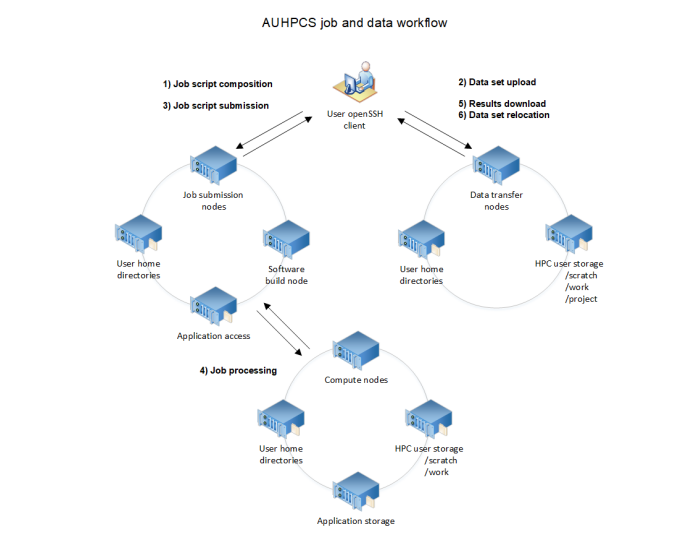
Managing and transferring data within the cluster is a straightforward process. The user-accessible file systems are detailed in the next section. Below is a simplified workflow for submitting a typical job to the cluster:
Prepare Job Scripts
Users compose job scripts for batch or interactive submission to the workload manager (SLURM).
Upload or Stage Data
New datasets are uploaded to the cluster.
Existing datasets from
/projectare staged on/home,/scratch, or/workfor compute node access.
Submit Jobs to SLURM
Jobs are submitted to the appropriate SLURM partitions using batch or interactive submission utilities.
Job Scheduling and Execution
The cluster schedules and executes jobs once the requested resources become available.
Retrieve and Analyze Results
Job results can be downloaded or analyzed by job owners.
Manage Data
Temporary datasets on
/home,/scratch, or/workcan be deleted or moved back to/projectfor continued research or future use.